Security
This section covers security-related details of SDL.
Ingress Networking & Authentication
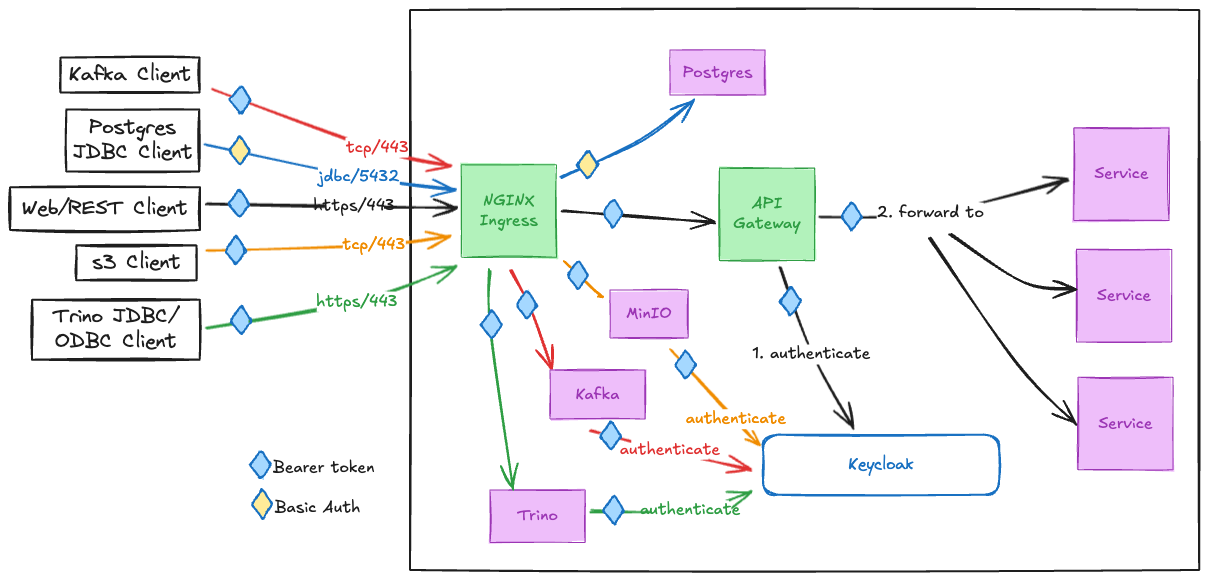
SDL exposes port 443 for the majority of network traffic, with the exception being Postgres, which listens on port 5432.
All inbound network traffic is handled by the NGINX Ingress kubernetes proxy.
SDL Data Access Traffic:
-
HTTPS/443-
API traffic is forwarded by NGINX Ingress to the SDL internal API Gateway, where the request is authenticated first against the internal Keycloak before being forwarded on to its destination service.
-
All internal
RESTcommunications usesBearertokens service-to-service. -
Basicusername/password credentials are automatically converted toBearertokens at the API Gateway.
-
-
Static resource requests, like those for loading web clients for various tools in SDL, are routed by NGINX Ingress directly to the target service.
-
-
Trino
JDBC/ODBCclients useTCP/443under the hood, and are routed from NGINX Ingress directly to Trino. Trino traffic is secured by Keycloak issued tokens. -
Kafka uses a custom binary
TCPbased protocol, and is routed by NGINX Ingress directly to Kafka. Kafka traffic is secured bySASL/OAUTHBEARER, which is SASL protocol with Keycloak issued tokens. -
s3traffic also usesHTTPS/443under the hood, and are routed from NGINX Ingress directly to MinIO. SDL MinIO supports Keycloak based authentication via MinIO’sSecure Token Service (STS), which authenticates users against their keycloak credentials, and issues temporary tokens similar to those used inOAUTH/OIDCflows. -
Postgres clients use
JDBC/5432, and that traffic is routed from NGINX Ingress directly to Postgres. Postgres uses internalBasicauthentication. Keycloak authentication support via Postgres Pluggable Authentication Modules (PAM) is planned for a future PI.
TLS terminates at NGINX Ingress.
Ingress Routes
| Protocol/Port | Subdomain | Path(s) | Destination Service | Authentication |
|---|---|---|---|---|
|
|
|
Bearer Token, Basic Auth |
|
|
|
|
Bearer Token |
|
|
|
|
Bearer Token |
|
|
|
|
Bearer Token |
|
|
|
|
|
|
|
|
|
|
|
|
|
|
|
|
|
|
|
|
|
|
|
|
MinIO STS token |
|
|
|
|
Bearer Token |
|
|
|
|
Basic Auth |
|
|
|
|
Bearer Token |
|
|
|
|
Bearer Token |
|
|
|
|
MinIO STS Token |
|
|
|
|
Basic Auth |
APIs
All the available APIs are listed on the main API landing
page rooted at https://DF_HOST/api.
| Endpoint | Description |
|---|---|
General identification of a cluster. |
|
Get health status of a cluster. |
|
Test auth credentials and basic connectivity. |
|
Platform Services |
|
Proxy to external services, with payload caching. |
|
Auth utilities (get a token, etc). |
|
Drop data into SDL. |
|
Connect to Kafka. |
|
S3 object storage. |
|
Data Services |
|
Data catalog. |
|
Data lake APIs. |
|
Data Access Authorization
SDL primary data access authorization strategy is a hybrid of the 3 following techniques:
-
Role Based Access Control (RBAC)
-
Attribute Based Access Control (ABAC)
-
Policy Based Access Control (PBAC)
Role Based Access Control (RBAC)
Role Based Access Control is a course-grained authorization strategy that relies on checking the requestors membership in specific roles/groups in order to grant access to resources.
SDL tends to use RBAC to authorize access to different datasets, or perform admin functions across various services. This authorization is performed at the service layer.
Attribute Based Access Control (ABAC)
Attribute Based Access Control is a fine-grained authorization strategy that is based on attributes of the user, resource, action, and environment. ABAC enforces policies dynamically by considering contextual data such as:
-
User attributes (e.g., role, department, clearance level).
-
Resource attributes (e.g., classification, owner, category).
-
Action attributes (e.g., read, write, delete).
-
Environmental attributes (e.g., time of access, location).
Policy Based Access Control (PBAC)
Policy Based Access Control is a fine-grained authorization strategy that uses a collections of predefined policies as rules-based decision making in order to grant access to resources.
Policies can be role-based (RBAC), attribute-based (ABAC), or other criteria.
SDL provides end (admin) user configurable authorization policies powered by Open Policy Agent (OPA), an Open Source, Rego based policy engine. This allows data access and authorization business rules to be implemented as configuration and easily modifiable due to evolving requirements, rather than hardcoded into custom applications.
SDL’s core implementation of classification, dissemination, and ACCM data access controls are implemented as OPA policies, based on the standardized Information Security Model (ISM) adopted across the program. This classification/dissemination control metadata structure is in every SDL data payload, or tagged to s3 objects.
Access control logic is split across multiple files by domain and function. Some files contain plumbing to connect to Keycloak to reference the user’s metadata, such as Roles, Groups, and Attributes.
OPA listens to REST calls on 8181, and serves the following types of requests:
-
authorization checks
-
policy management
-
telemetry
None of the above functions are directly exposed outside of SDL.
OPA in SDL
The diagram below shows the connectivity of OPA to various major services in SDL. OPA references SDL Keycloak as needed to grab the roles, groups, and attributes of the user that OPA is performing an access decision on. The Keycloak attributes contain the user’s clearance, nationality, compartments and program reasons, etc.
SDL Keycloak in turn federates with the larger program Keycloak/Identity Provider (IDP) solution to get the federated users, attributes, and any program wide roles and groups.
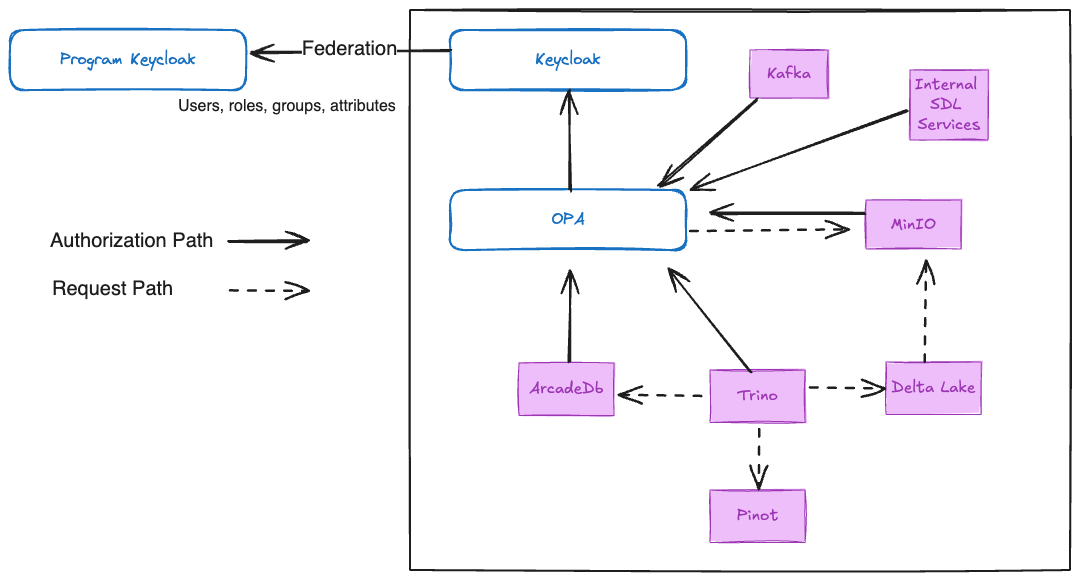
There are two patterns of OPA authorization in SDL:
Resource based authorization
Resource based authorization requests are when authorization checks to individual resources are made, one at a time, to OPA, and authorized if the requesting user has sufficient clearance and Need to Know (NTK) to the requested resource. These are used in the following ways:
-
Kafka
-
Classification/dissemination based authorization checks for kafka topics, leveraging the program ISM tags to filter available topics for a user..
-
-
MinIO (s3)
-
Classification/dissemination based authorization checks for each object in any requested bucket, leveraging the program ISM tags on the objects.
-
Predicate based authorization
Predicate based authorization requests are when the shape of a user’s data access is exported from OPA, and converted into query predicates. Those query predicates are transparently applied to the original user data request to limit the data returned or modified to just what they have access to.
This technique is extremely useful when data access controlling query surfaces over large datasets, where lazily checking permission to every single object would be prohibitively expensive. Each datastore or query surface that uses this technique will have applied the program adopted ISM data access controls to every data element in their system.
The following query surfaces/datastores use predicate based authorization:
-
Delta Lake (via Trino)
-
Pinot (via Trino)
-
Trino
SBOM
Below is the list of 3rd party images used.
{registry}/dockerhub/apache/flink-kubernetes-operator:1.8.0
{registry}/dockerhub/bitnami/kafka:3.5.1
{registry}/dockerhub/bitnami/os-shell:12
{registry}/dockerhub/bitnami/schema-registry:7.8.0
{registry}/dockerhub/bluenviron/mediamtx:1.9.0
{registry}/dockerhub/busybox:1.36
{registry}/dockerhub/curlimages/curl:8.12.1
{registry}/dockerhub/datarhei/restreamer:2.11.0
{registry}/dockerhub/dpage/pgadmin4:2024-05-28-1
{registry}/dockerhub/getmeili/meilisearch:v1.4.0
{registry}/dockerhub/grafana/grafana:9.2.4
{registry}/dockerhub/grafana/loki:2.4.2
{registry}/dockerhub/jimmidyson/configmap-reload:v0.5.0
{registry}/dockerhub/jupyterhub/k8s-image-awaiter:3.0.0
{registry}/dockerhub/jupyterhub/k8s-network-tools:3.0.0
{registry}/dockerhub/jupyterhub/k8s-secret-sync:3.2.1
{registry}/dockerhub/kindest/node:v1.30.0
{registry}/dockerhub/nginx:1.27.2
{registry}/dockerhub/postgis/postgis:16-3.4
{registry}/dockerhub/postgres:14
{registry}/dockerhub/provectuslabs/kafka-ui:v0.7.1
{registry}/dockerhub/swaggerapi/swagger-ui:v5.18.2
{registry}/dockerhub/liquibase/liquibase:4.25
{registry}/dockerhub/redis:7.0.11-alpine
{registry}/dockerhub/shadowtraffic/shadowtraffic:0.6.3
{registry}/dockerhub/wiremock/wiremock:3.11.0
{registry}/dockerhub/yuzutech/kroki:0.25.0
{registry}/dockerhub/yuzutech/kroki-bpmn:0.25.0
{registry}/dockerhub/yuzutech/kroki-excalidraw:0.25.0
{registry}/dockerhub/yuzutech/kroki-mermaid:0.25.0
{registry}/gcr/kubebuilder/kube-rbac-proxy:v0.8.0
{registry}/ghcr/raft-tech/df-geoserver:1.14.1
{registry}/ghcr/raft-tech/df-postgis:1.15.6
{registry}/ghcr/stakater/reloader:v1.0.121
{registry}/ironbank/bitnami/zookeeper:3.9.3
{registry}/ironbank/afrl-dcgs/stream/ingress-nginx-controller:v1.9.4
{registry}/ironbank/opensource/apache-pinot:1.2.0
{registry}/ironbank/opensource/grafana/promtail:v2.9.4
{registry}/ironbank/opensource/jupyterhub/configurable-http-proxy:4.6.1
{registry}/ironbank/opensource/jupyterhub/k8s-hub:4.0.0
{registry}/ironbank/opensource/kubernetes/kube-state-metrics:v2.8.0
{registry}/ironbank/opensource/minio/minio:RELEASE.2024-06-04T19-20-08Z
{registry}/ironbank/opensource/minio/mc:RELEASE.2024-11-17T19-35-25Z
{registry}/ironbank/opensource/openpolicyagent/opa:0.61.0
{registry}/ironbank/opensource/redis/redis7:7.2.4
{registry}/k8s/ingress-nginx/controller:v1.9.4
{registry}/k8s/ingress-nginx/kube-webhook-certgen:v1.1.1
{registry}/k8s/kube-scheduler:v1.19.15
{registry}/k8s/pause:3.5
{registry}/ironbank/jetstack/cert-manager-cainjector:v1.9.1
{registry}/ironbank/jetstack/cert-manager-controller:v1.9.1
{registry}/ironbank/jetstack/cert-manager-ctl:v1.9.1
{registry}/ironbank/jetstack/cert-manager-webhook:v1.9.1
{registry}/quay/kiwigrid/k8s-sidecar:1.19.2
{registry}/quay/prometheus-operator/prometheus-config-reloader:v0.60.1
{registry}/quay/prometheus-operator/prometheus-operator:v0.60.1
{registry}/quay/prometheus/alertmanager:v0.24.0
{registry}/quay/prometheus/node-exporter:v1.3.1
{registry}/quay/prometheus/prometheus:v2.39.1
{registry}/quay/strimzi/kafka:0.44.0-kafka-3.8.0
{registry}/quay/strimzi/operator:0.44.0