Clients
S3 is available to external clients over s3, as well as a few supported operations over http REST (for convenience).
|
The The REST client should be used sparingly, as that creates a new STS session for every invocation. |
mc Client
To use MinIO’s mc client, you will need to perform a token exchange with MinIO’s Security Token Service (STS).
This creates a temporary STS session with your user credentials.
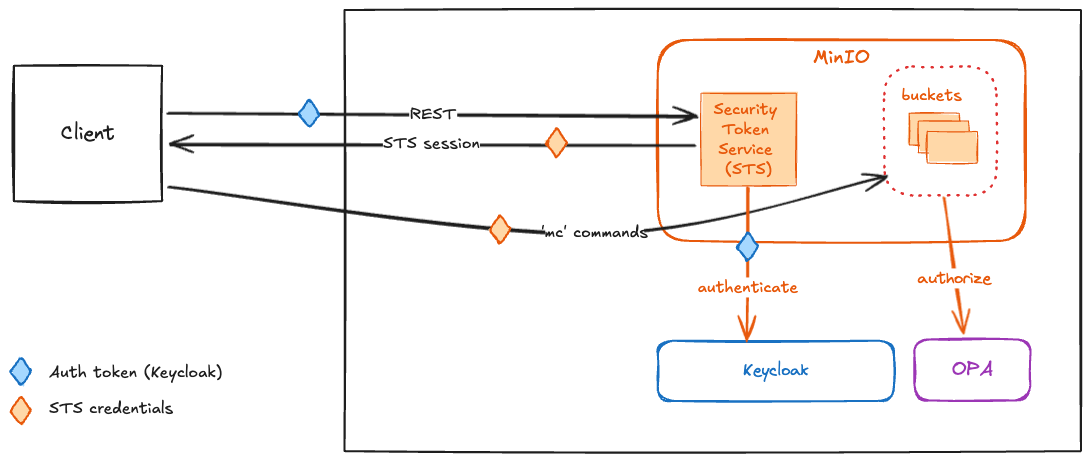
The basic flow is, with your SDL auth token:
-
Get an STS session.
-
Use the STS session access key, secret and token with your
s3client of choice.
|
The procedures listed below use the following to assist in extracting elements from service response payloads:
If you don’t have these, you can still run through the steps but you will need to extract the parts from the responses yourself. |
Auth Token
If you do not have one yet, get an auth token for yourself from SDL with an audience for the df-minio keycloak client.
HOST=localhost
USER=your_username
PASS=your_password
AUTH_TOKEN=$(curl -sk -X POST \
  "https://$HOST/api/v1/auth/token" \
  -H 'accept: application/json' \
  -H 'Content-Type: application/x-www-form-urlencoded' \
  -d "grant_type=password&username=$USER&password=$PASS&client_id=df-minio&client_secret=" \
  | jq -r '.access_token')
Open an STS Session
Using your AUTH_TOKEN, get an STS session credentials.
HOST=localhost
STS_CREDENTIALS=$(curl -sk -X POST \
  "https://s3.$HOST?Action=AssumeRoleWithWebIdentity&Version=2011-06-15&WebIdentityToken=$AUTH_TOKEN" \
  | yq --input-format xml '.AssumeRoleWithWebIdentityResponse.AssumeRoleWithWebIdentityResult.Credentials')
From the STS_CREDENTIALS, parse out the session access key, secret and token.
STS_ACCESS_KEY=$(echo -n $STS_CREDENTIALS | yq '.AccessKeyId')
STS_SECRET_KEY=$(echo -n $STS_CREDENTIALS | yq '.SecretAccessKey')
STS_SESSION_TOKEN=$(echo -n $STS_CREDENTIALS | yq '.SessionToken')|
STS sessions are short-lived, and will expire after 15 minutes. |
Configure mc
Export a MC_HOST_{alias} environment variable to configure the mc client, using your STS access key, secret and session token.
export MC_HOST_myalias=https://$STS_ACCESS_KEY:$STS_SECRET_KEY:$STS_SESSION_TOKEN@s3.localhost|
If the certificate your SDL instance is running with cannot be verified, you will need to tell |
Then use mc as you normally would.
mc ls myaliasgo Client
The go client for MinIO handles the STS token exchange for you, and will also renew the token
if/when it expires.
To set up the client, you just pass it the URL to MinIO and your SDL auth token.
The example go code below is a function you can drop into your go app for
creating a minio.Client instance.
import (
	"fmt"
	"github.com/minio/minio-go/v7"
	"github.com/minio/minio-go/v7/pkg/credentials"
	"github.com/rs/zerolog/log"
	"net/url"
)

// newMinioStsClient creates a new minio client with "STSWebIdentity" credentials.
// The `stsEndpoint` should be the URL to minio's REST API (ex: http://s3.localhost).
// The `authToken` should be the invoking user's base64 encoded JWT (note that this needs an audience with the `df-minio` client).
func newMinioStsClient(stsEndpoint, authToken string) (*minio.Client, error) {
	log.Debug().Msgf("STS endpoint: %s", stsEndpoint)

	var getWebTokenExpiry = func() (*credentials.WebIdentityToken, error) {
		return &credentials.WebIdentityToken{
			Token: authToken,
		}, nil
	}

	stsUrl, err := url.Parse(stsEndpoint)
	if err != nil {
		return nil, fmt.Errorf("Failed to parse STS Endpoint '%s':  %w", stsEndpoint, err)
	}

	sts, err := credentials.NewSTSWebIdentity(stsEndpoint, getWebTokenExpiry)
	if err != nil {
		return nil, fmt.Errorf("Could not get STS credentials from '%s':  %w", stsEndpoint, err)
	}

	opts := &minio.Options{
		Creds:        sts,
		BucketLookup: minio.BucketLookupAuto,
	}

	return minio.New(stsUrl.Host, opts)
}
Using the function above, create a minio client for a user’s session with their auth token.
mc, _ := newMinioStsClient("http://s3.localhost", token)And retain it for the life of your user auth token session. The client will renew the STS session when needed.
buckets, _ := mc.ListBuckets(context.Background())REST Client
The REST API is rooted at /api/v1/s3 and provides basic bucket and object operations suitable for simple workloads.
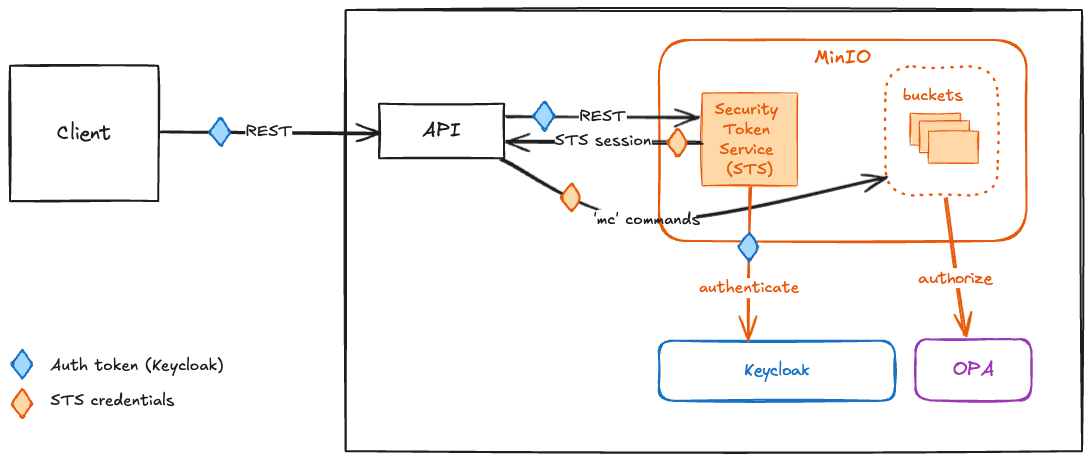
Below are just a few basic examples using the REST API.
List Available Buckets
curl -X 'GET' \
  'http://localhost/api/v1/s3/buckets' \
  -H 'accept: application/json' \
-H 'Authorization: Basic YWRtaW46eUNITHBDaG12dDRuTVUwNWpaZTZBbGl0' (1)| 1 | Can use Basic (username/password) or Bearer token. |
[
  {
    "name": "df-backups",
    "creationDate": "2024-11-04T18:41:50.255Z"
  },
  {
    "name": "df-notebooks",
    "creationDate": "2024-11-04T18:41:51.321Z"
  },
  {
    "name": "df-schemas",
    "creationDate": "2024-11-04T18:41:56.739Z"
  },
  {
    "name": "inbox-public",
    "creationDate": "2024-11-04T18:42:00.742Z"
  }
]| Actual bucket listing will vary. |
Upload a File
curl -X 'PUT' \
  'http://localhost/api/v1/s3/buckets/inbox-public/objects/content?objectName=my-file.txt&classification=UNCLASSIFIED' \ (1)
  -H 'accept: application/json' \ (2)
  -H 'Authorization: Basic YWRtaW46eUNITHBDaG12dDRuTVUwNWpaZTZBbGl0' \ (3)
  -H 'Content-Type: application/json' \
-d 'This is my file.' (4)| 1 | Uploading file my-file.txt to bucket inbox-public with marking UNCLASSIFIED. |
| 2 | The response will be a JSON payload describing the uploaded object. |
| 3 | Can use Basic (username/password) or Bearer token. |
| 4 | Raw content of file. |
{
  "name": "my-file.txt",
  "etag": "32ea80dfecd60916d9091b304dd4efb0-1",
  "sizeBytes": 16
}
List Objects in Bucket
curl -X 'GET' \
  'http://localhost/api/v1/s3/buckets/inbox-public/objects' \ (1)
  -H 'accept: application/json' \
-H 'Authorization: Basic YWRtaW46eUNITHBDaG12dDRuTVUwNWpaZTZBbGl0' (2)| 1 | List contents of bucket inbox-public. |
| 2 | Can use Basic (username/password) or Bearer token. |
[
  {
    "name": "my-file.txt",
    "tags": {},
    "etag": "32ea80dfecd60916d9091b304dd4efb0-1",
    "classification": {
      "raw": "U",
      "components": {
        "classification": "U",
        "disseminationControls": [],
        "ownerProducer": [
          "USA"
        ],
        "releasableTo": []
      }
    },
    "lastModified": "2024-11-04T22:05:18.561Z",
    "sizeBytes": 16
  }
]
Download a File
curl -X 'GET' \
  'http://localhost/api/v1/s3/buckets/inbox-public/objects/content?objectName=my-file.txt' \ (1)
  -H 'accept: */*' \
-H 'Authorization: Basic YWRtaW46eUNITHBDaG12dDRuTVUwNWpaZTZBbGl0' (2)| 1 | Downloading file my-file.txt from bucket inbox-public. |
| 2 | Can use Basic (username/password) or Bearer token. |
The response will be an octet stream of the binary content of the file.