Keycloak
SDL leverages Keycloak for Identity and Access Management.
Keycloak is a lightweight feature rich Identity and Access Management tool that abstracts the need to implement any authentication mechanisms into our own applications. Additionally, applications will not have direct access to user credentials.
SDL uses OAuth 2.0 and OpenID Connect which Keycloak offers out of the box.
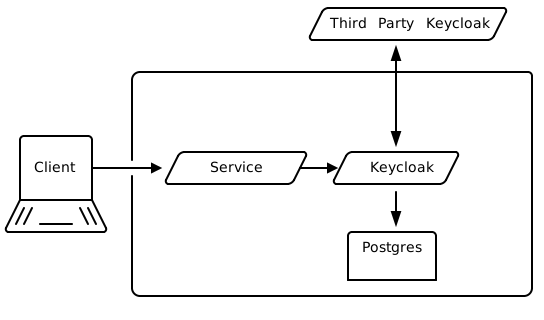
SDL Keycloak Sequence Diagram
-
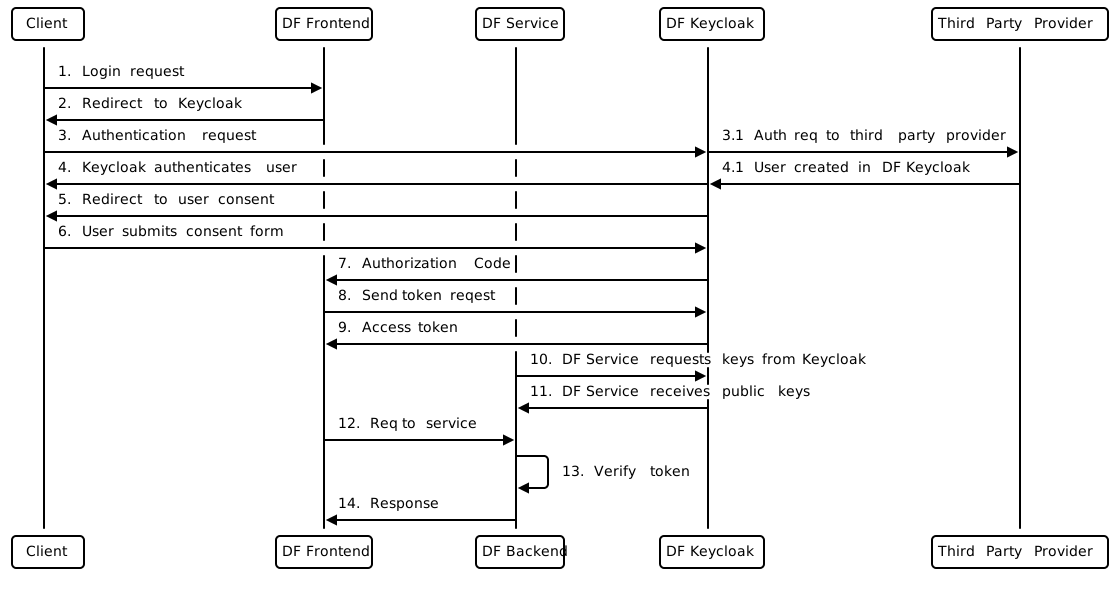
DF User attempts to login to SDL.
-
User is redirected to Keycloak login page.
-
User fills out login page username and password and submits the form. 3.1 If the user has an account from a third party, the user will fill out the login page from third party provider and submit the form.
-
Keycloak returns an authorization code to the user. 4.1 If the user did not exist in DF Keycloak, the user will be created from the third party provider.
-
Once the user is authenticated, they are redirected to the consent form.
-
User must consent to accepting access to application.
-
Keycloak issues an authorization token.
-
Application uses authorization token to fetch access token, refresh token, and id token from Keycloak.
-
Access token, ID Token, and refresh token response.
-
If the DF Service has not already requested the keys from Keycloak, the request will be made and keys will be cached.
-
Keycloak sends the Service the public keys.
-
A request is made to a DF Service.
-
The DF Service validates the access token with the Keycloak public keys. Verifies the user is able to access other resources given they have the appropriate roles.
-
DF Service returns the reponse.