SOF Data Model
The SOF Data Model (SDM) is the shared tactical entity model used by SDL to publish, stream, query, exchange, and reconstruct operational data across platform services. SDM gives tactical systems a compact common shape for data that appears in a common operational picture while still preserving source-specific payloads.
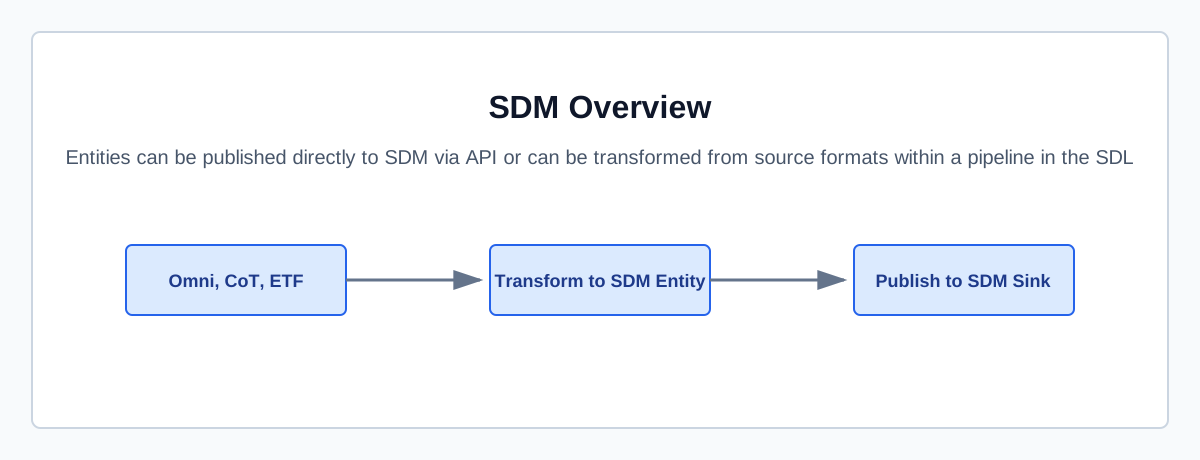
What is SDM?
SDM represents tactical data as entities. An entity can be a platform, unit, person, sensor, signal, event, route, area, control measure, or other map-drawable feature.
The common entity contract focuses on fields that are useful across many source systems:
-
Identity — stable entity IDs and external identifiers for correlation.
-
Type — broad operational domain, producer-specific kind, and source standard.
-
Location and motion — point position, uncertainty, orientation, velocity, speed, and acceleration.
-
Geometry — point, line, polygon, circle, ellipse, rectangle, radial arc, route, orbit, and corridor shapes.
-
Assessment — tactical affiliation and operating environment.
-
Security — default markings and optional field-level overrides.
-
Provenance — source attribution, update time, collection method, reliability, credibility, producer, and responsible actor.
-
Labels — small indexed key-value pairs for routing, filtering, and grouping.
Source-specific data lives in Entity.details or Entity.external_refs.
Use typed fields when data is broadly useful to many consumers.
Use details for producer-specific attributes, raw message fragments, or fields that should not become part of the shared contract yet.
Why SDM Matters
SDM reduces format coupling between tactical systems. Producers can map native formats into one shared entity contract, and consumers can build against that contract instead of every upstream message format.
This matters for SOF workflows because mission data often crosses source, network, enclave, and application boundaries. SDM provides:
-
Interoperability — tactical formats can meet at a common entity layer.
-
Streaming and replay — current state, live updates, and accepted history records share one model.
-
Operational filtering — services can query by entity ID, status, domain, kind, affiliation, environment, labels, provenance, or bounding box.
-
Extensibility — source-specific payloads remain available without expanding the top-level model for every feed.
-
Provenance-aware fusion — consumers can reason about where data came from, when the source updated it, how it was collected, and how credible it is.
Entity Model
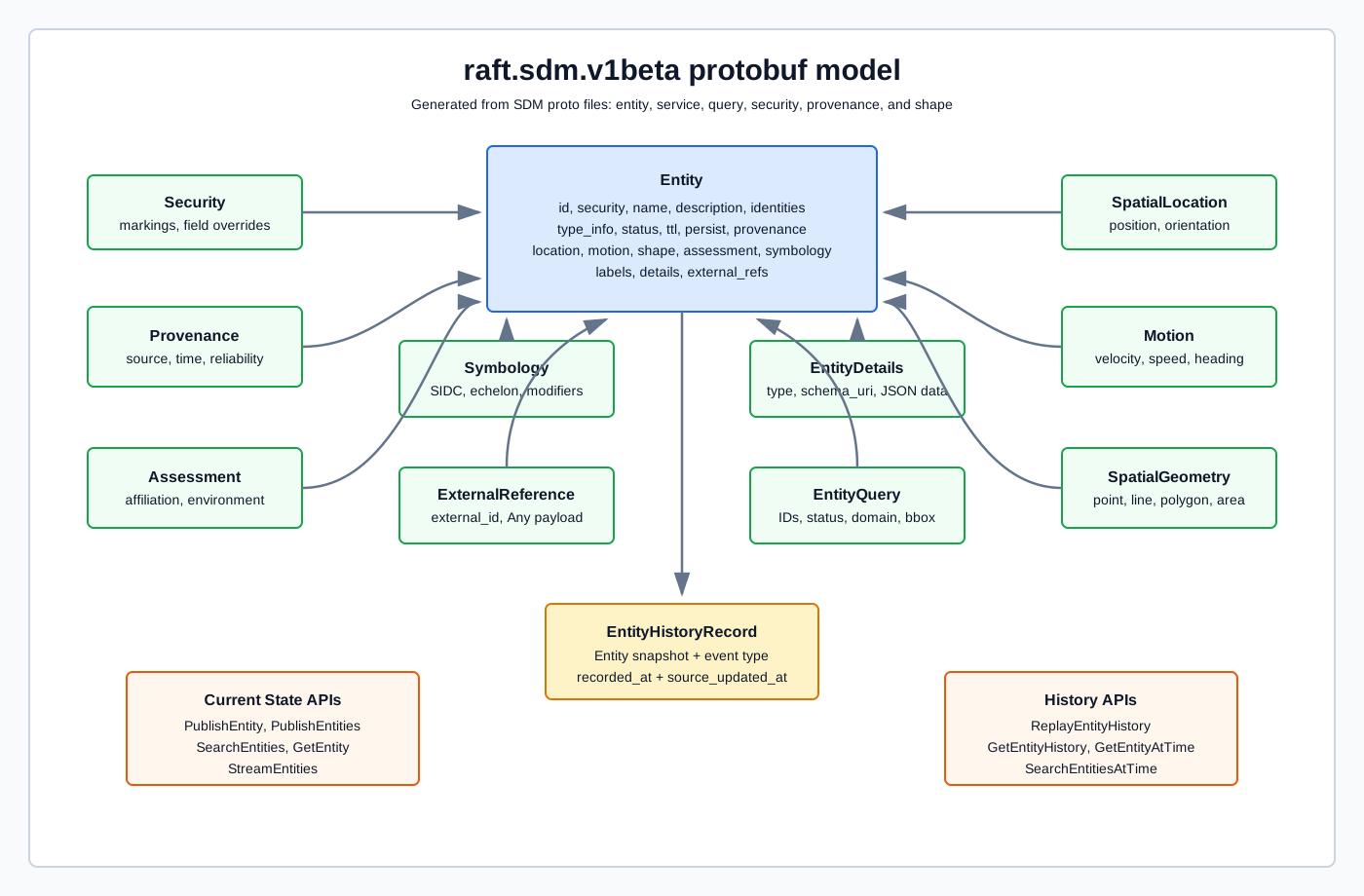
The SDM protobuf package is raft.sdm.v1beta.
The main files are:
| File | Purpose |
|---|---|
|
Defines |
|
Defines position and map-drawable geometry types. |
|
Defines security markings and field-level security overrides. |
|
Defines source attribution, collection method, reliability, credibility, and responsible actors. |
|
Defines flat entity queries and richer boolean stream filters. |
|
Defines public publish, search, get, stream, and history APIs. |
API Surface
The public SDM entity service is raft.sdm.v1beta.EntityService.
It supports ConnectRPC and gRPC, with REST transcoding for unary methods in the OpenAPI spec.
| API | Purpose |
|---|---|
|
Creates or updates one entity. |
|
Publishes a client stream of entity updates. |
|
Retrieves a paged snapshot of matching current entities. |
|
Retrieves one current entity by ID. |
|
Streams initial and live entity lifecycle events using boolean stream filters. |
SDM Page
The SDL SDM page lets operators search live SDM entity records, inspect entity details, review entity history, and hand matching entities to Maps for geospatial visualization. Use it when you need to validate what SDM is receiving, narrow records to a specific entity, or inspect the latest operational state for an entity published by a pipeline or external producer.
-
Sign in to the SDL web UI.
-
Open SDM from the main navigation.
-
Use the Query panel to build a filter, then click Search.
The SDM page starts with no stream open. Search opens the SDM entity stream using the current filter. Clear resets the filter and closes the current search.
On wide screens, the query panel and entity records are shown side by side. On smaller screens, use the Query and Results tabs to move between filter editing and matching records.
Search Without Filters
Click Search with the default empty filter to open the stream without narrowing matches. This is useful for confirming that SDM is receiving entities and for sampling current operational traffic.
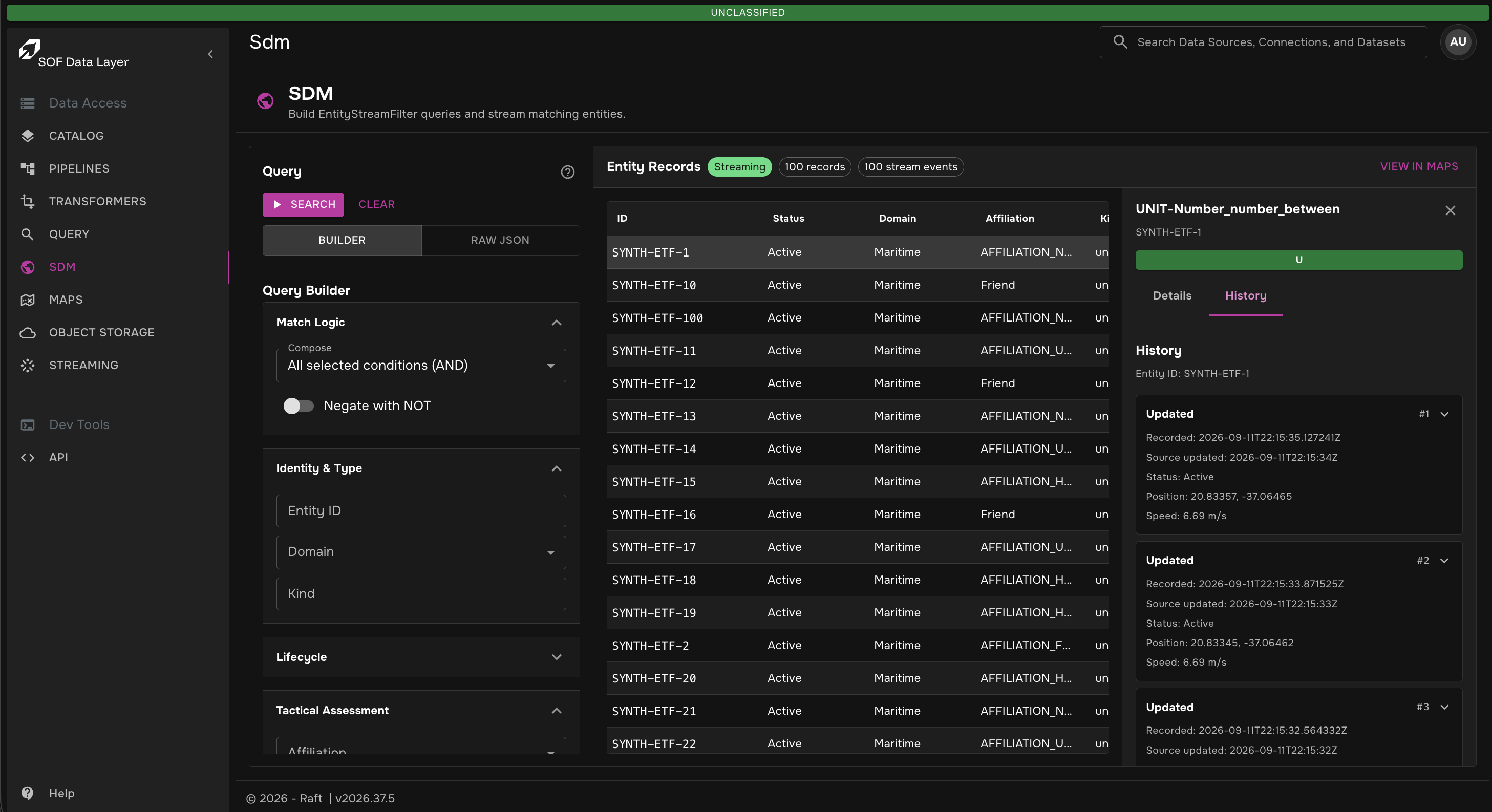
After the stream opens, the Entity Records workspace shows:
-
Status — stream state for the current search.
-
Records — number of matching entity records currently held in the page.
-
Stream events — number of stream events received for the current search.
-
View in Maps — opens Maps with the current SDM filter when records are available.
The records table includes each entity’s ID, status, domain, affiliation, kind, latitude, longitude, and last updated time. Matching records appear as stream events arrive.
Filter with the Query Builder
Use Builder mode for guided filter construction.
The query builder writes the SDM EntityStreamFilter JSON for you.
Builder sections include:
-
Match Logic — compose selected conditions with
ANDorOR, and optionally negate the filter withNOT. -
Identity & Type — filter by entity ID, domain, or kind.
-
Lifecycle — filter by entity status.
-
Tactical Assessment — filter by affiliation or environment.
-
Location & Motion — filter by bounding box or minimum speed.
-
Source & Metadata — filter by source name or label key and value.
-
Details & Advanced — filter by field path, comparator, and field value.
To search for one entity:
-
Keep Builder selected.
-
Expand Identity & Type.
-
Enter the entity identifier in Entity ID.
-
Click Search.
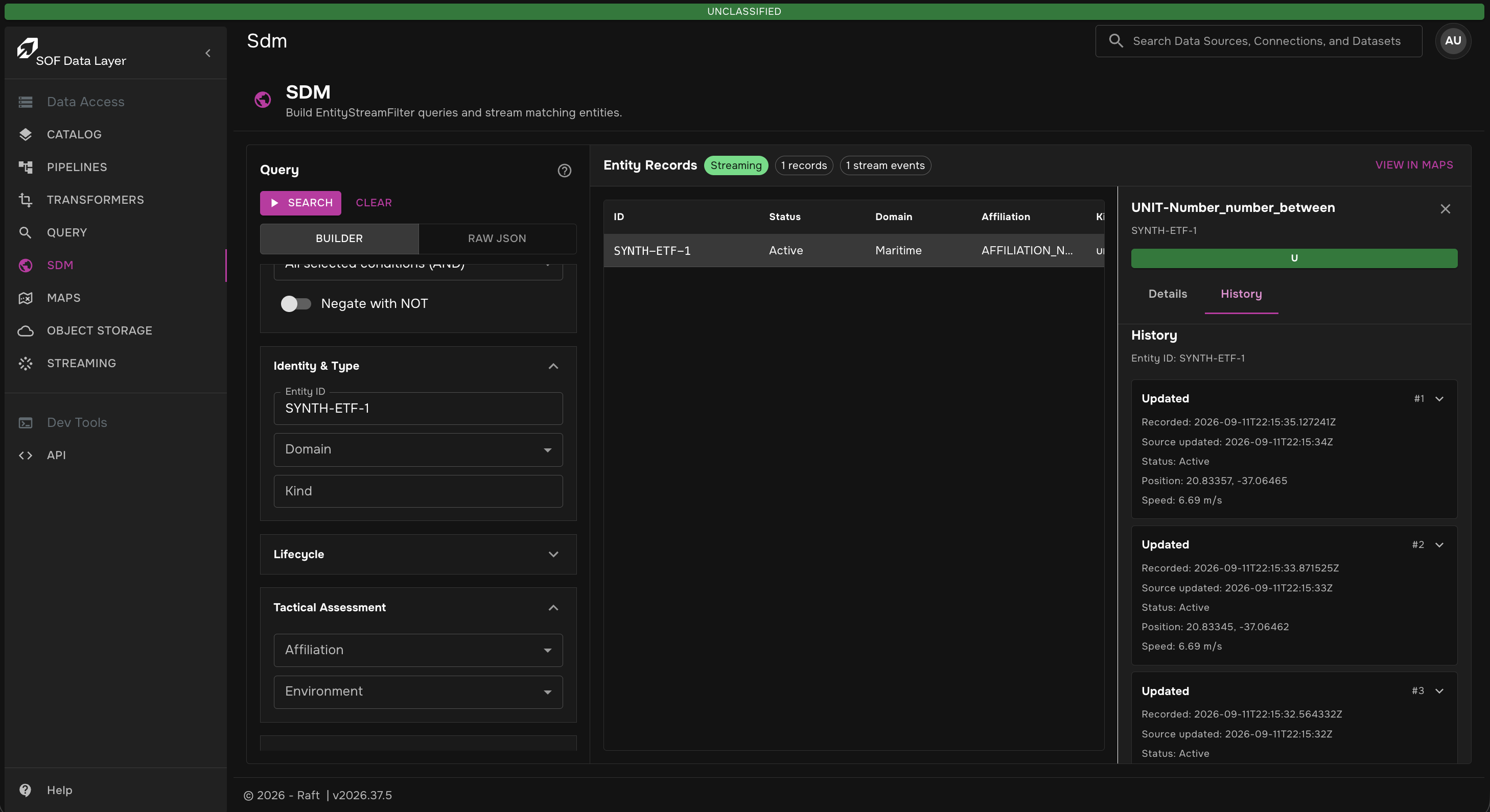
When you change a filter after searching, the page keeps showing results from the last searched JSON until you click Update Search.
Edit Raw JSON
Use Raw JSON mode when you need to paste or edit a full EntityStreamFilter object directly.
The page validates the JSON before allowing search.
Click the query help icon to open examples for:
-
an empty filter,
-
a single predicate statement,
-
ANDstatement groups, -
ORstatement groups, -
NOTstatements.
Use Raw JSON for filters that are easier to express as nested statements than through the builder controls.
Inspect Entity Details
Click an entity row to open the details rail. The details rail fetches the full entity by ID and shows the selected entity’s current SDM record.
Use the Details tab to inspect operational fields, source metadata, security markings, location, motion, and raw entity JSON. Use the History tab to load recent history records for the selected entity.
History requests load the newest records first. If more history is available, use the load-more action to continue paging through the entity timeline.
View Results in Maps
When a search returns records, click View in Maps to open Maps with the current SDM filter. Use this handoff when matching records need spatial context, clustering, AOI comparison, or overlay with GeoServer and TileService layers.
The Maps page uses the same SDM filter JSON, so the entities shown on the map correspond to the search you ran from the SDM page.
History APIs
SDM stores accepted entity changes as immutable history records.
History records include the entity snapshot, lifecycle event type, server-recorded time, source update time, and a monotonic history_id.
| API | Purpose |
|---|---|
|
Replays accepted history records in durable recorded order across an optional recorded-time range. |
|
Retrieves the recorded change log for one entity. |
|
Retrieves one entity snapshot as it existed at or before a source timestamp. |
|
Searches reconstructed entity snapshots as they existed at or before a source timestamp. |
SDM keeps two time concepts:
-
recorded_at— server time when the node accepted and recorded the change. Used for audit order, replay, partitioning, and cursors. -
source_updated_at— copied fromentity.provenance.updated_at. Used for source-timeline reconstruction and at-time queries.
Deleted snapshots are excluded from at-time results by default unless the request explicitly includes deleted records.
Available Transformers
SDL provides built-in SDM-compatible transformations through the sdmproto format.
These transformers let pipelines convert source formats into SDM, convert SDM into downstream tactical formats, or pass SDM protobuf messages through unchanged.
| Direction | Transformer | Notes |
|---|---|---|
To SDM |
|
Converts CATAPULT document JSON to SDM entities. |
To SDM |
|
Converts Cursor-on-Target XML events to SDM entities. |
To SDM |
|
Converts Cursor-on-Target protobuf events to SDM entities. |
To SDM |
|
Converts Extended Track Format protobuf records to SDM entities. |
To SDM |
|
Converts GeoJSON features to SDM entities. |
To SDM |
|
Converts SDM Entity JSON to binary SDM protobuf. |
To SDM |
|
Converts MISB/KLV JSON metadata to SDM entities. |
To SDM |
|
Converts OMNI protobuf records to SDM entities. |
From SDM |
|
Converts SDM entities to Cursor-on-Target XML. |
From SDM |
|
Converts SDM entities to Cursor-on-Target protobuf. |
From SDM |
|
Converts SDM entities to Extended Track Format protobuf. |
From SDM |
|
Converts SDM entities to GeoJSON. |
From SDM |
|
Converts binary SDM protobuf to SDM Entity JSON. |
From SDM |
|
Converts SDM entities to OMNI protobuf. |
Passthrough |
|
Passes SDM protobuf messages through unchanged. |
Developer Resources
Developers can download the SDM protobuf and OpenAPI source bundle from the SDM Developer Guide page.